Feb 4, 2026 · Updated Nov 2, 2026
# Transloadit MCP Server: agent-native uploads and processing

**Kevin van Zonneveld**
Co-founder · Amsterdam, The Netherlands · Show bio
[](https://x.com/kvz)[](https://github.com/kvz)
Agents are already good at working with text. File pipelines are where things tend to fall apart. What people actually want is simpler: "take this video and turn it into HLS", "make web-ready image variants", "OCR this PDF and give me structured text", "generate thumbnails", "export everything to S3".
Those are all things Transloadit is already good at. The MCP server is how you hand that toolbox to an agent, so it can run real media workflows from natural language.
Today, we're shipping the **Transloadit MCP Server**, an MCP integration that lets agents upload files, create Assemblies, discover Templates, and fetch results from Transloadit.
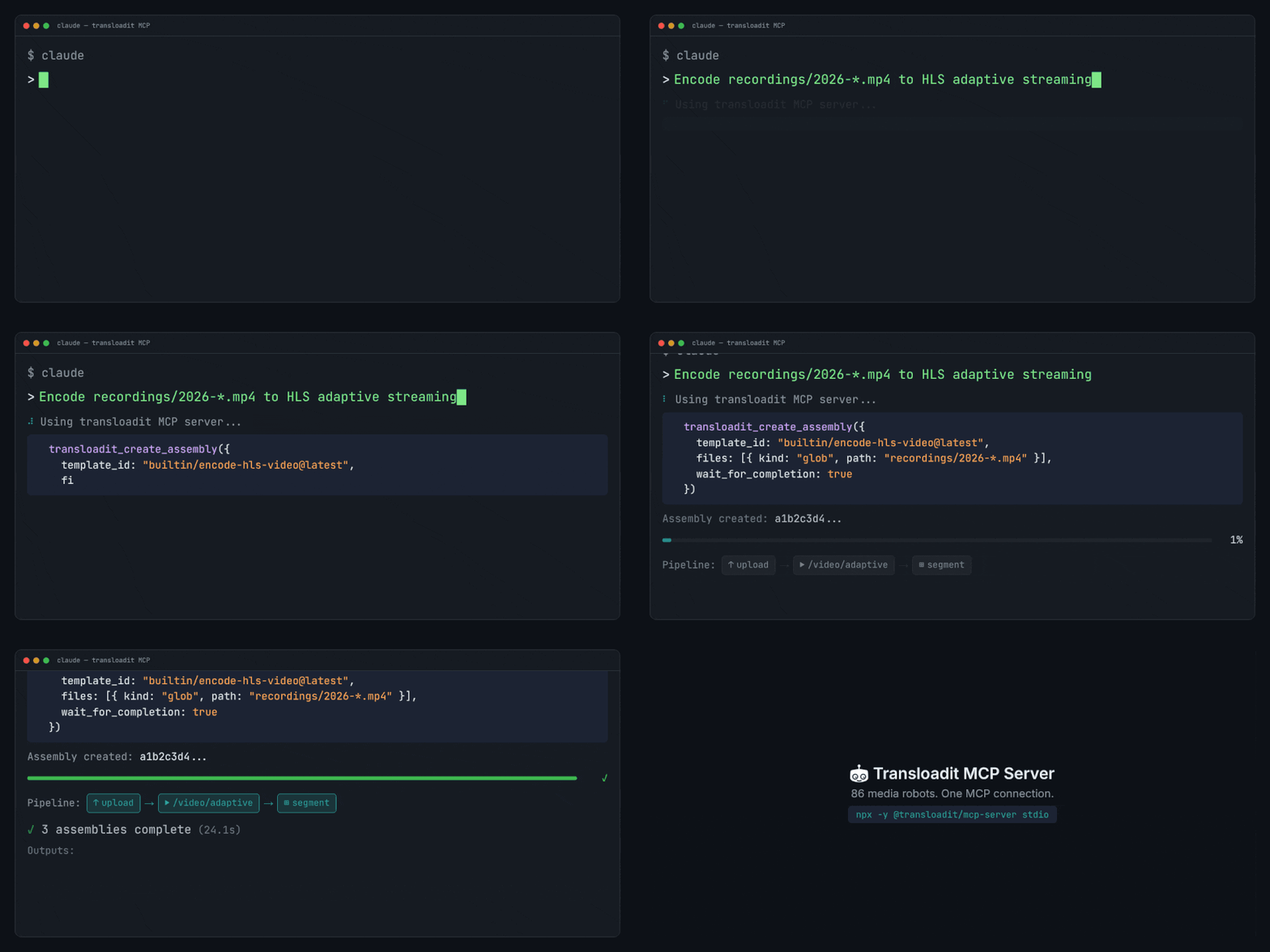
If you're building agent workflows in [Claude Code](https://github.com/anthropics/claude-code), [Gemini CLI](https://github.com/google-gemini/gemini-cli), [OpenAI Codex](https://openai.com/codex), or [Cursor](https://docs.cursor.com/context/model-context-protocol), the Transloadit MCP Server gives the model a small, predictable tool surface. In practice that means fewer invented endpoints, shorter prompts, and workflows that actually run end to end.
## What you can do with the Transloadit MCP Server
* Upload local files and resume large uploads with [tus](https://tus.io).
* Create Assemblies with full instructions and follow results.
* List and use Templates (including built-in ones).
* Validate and lint Assembly Instructions before running your Assemblies.
## MCP vs. skills/CLI
MCP is best for embedded runtime use: long-lived or autonomous agent pipelines where Transloadit runs repeatedly (uploads, assemblies, polling, results).
Skills/CLI are best for human-directed, one-off jobs: setting up integrations, generating Templates, scaffolding code, or running a single processing task locally with full repo/tool access.
These are guidelines, though, not hard rules. Some systems (for example [OpenClaw](https://docs.openclaw.ai/)) can work beautifully with skills, and MCP can also be great for interactive, human-in-the-loop flows. The right choice depends on your environment and preferences. We'll keep supporting both.
## Quick start (agents)
For a local (self-hosted) setup, add the MCP server to your agent client. The client starts the server automatically via `npx -y @transloadit/mcp-server stdio`. Configure `TRANSLOADIT_KEY` with your Transloadit Auth Key and `TRANSLOADIT_SECRET` with your Auth Secret in the server’s environment for tools that access your account. Robot documentation tools work without these credentials.
See the setup instructions for Claude, Codex, Gemini, and Cursor in the [MCP Server README](https://github.com/transloadit/node-sdk/tree/main/packages/mcp-server).
To connect to the hosted MCP endpoint (`https://api2.transloadit.com/mcp`), follow [Connect Transloadit to ChatGPT, Claude, and Codex](/blog/2026/10/connect-transloadit-to-chatgpt-claude-and-codex.md) for client setup and browser sign-in.
For headless hosted access, use your Transloadit Auth Key and Auth Secret with `npx -y @transloadit/node auth token --aud mcp` to generate a Bearer token, then send it in the `Authorization: Bearer ` header. The response’s `expires_in` value gives the token’s lifetime in seconds.
## Local vs hosted
* **Local (self-hosted) MCP** works with local file paths.
* **Hosted MCP** accepts public URLs, ChatGPT attachments, or sandbox uploads using an upload slot that returns a ready-to-run `curl` command over [tus](https://tus.io/). See [how to get files to Transloadit](/blog/2026/10/connect-transloadit-to-chatgpt-claude-and-codex.md#get-files-to-transloadit-wherever-they-are).
## What's next
We also shipped [Transloadit Agent Skills](/blog/2026/02/how-we-built-transloadit-agent-skills.md). These are version-controlled playbooks that teach agents repeatable media workflows. MCP provides agents with tools; skills teach them how to use those tools well. The two complement each other.
Next up is more polish around uploads, linting, and Template discovery. We will also expand the MCP tool surface based on what people actually build. If you are building an agent flow and want something exposed or improved, let us know.
[#mcp](/blog/tags/mcp.md)[#agents](/blog/tags/agents.md)[#developer-experience](/blog/tags/developer-experience.md)[#uploads](/blog/tags/uploads.md)
### Join 25k+ developers
Sign up for our [monthly newsletter](/newsletters.md) to receive direct links to 3 exclusive tech — and 2 product updates. No less, no more.
Email address
Subscribe
One email a month. Unsubscribe anytime.
## File uploading and encoding. Made simple.
Trusted by Coursera and The New York Times for a reliable API, top-notch support, and open source like [Uppy](https://uppy.io) and [Tus](https://tus.io).
[Try it free](/c/signup/)[Request a demo](/request-demo.md)
No credit card needed · Cancel anytime