

Best audio format: MP3, AAC, WAV, FLAC, or Opus?

There is no single best audio format. Use AAC in an M4A or MP4 container for efficient playback across modern consumer devices, MP3 when broad legacy compatibility matters, FLAC for lossless distribution or archives, WAV for editing, and Opus for bandwidth-efficient speech and real-time audio.
The right choice depends on whether you prioritize compatibility, quality, file size, editability, or latency. This guide compares those tradeoffs and shows how to normalize unpredictable uploads with one audio-processing workflow.
Audio format recommendations by use case
| Use case | Recommended format | Why |
|---|---|---|
| Web and app playback | AAC in MP4/M4A | Strong quality and broad device support |
| Real-time voice and WebRTC | Opus | Good quality at low bitrates and low latency |
| Maximum compatibility | MP3 | Plays on almost every consumer device |
| Lossless music downloads | FLAC | Preserves the signal with smaller files than WAV |
| Recording and editing | WAV with PCM | Simple, uncompressed audio for production tools |
| Open media workflows | Opus or Vorbis | Royalty-free codecs commonly stored in Ogg or WebM |
What factors determine audio quality?
When considering audio quality, several factors come into play:
Bitrate: The number of bits used per second. Within the same codec and configuration, a higher bitrate usually improves quality and increases file size. Bitrate alone is not a reliable way to compare different codecs.
Compression: Lossy codecs such as MP3, AAC, Vorbis, and Opus remove information to produce smaller files. Lossless codecs such as FLAC reduce size while preserving the decoded signal.
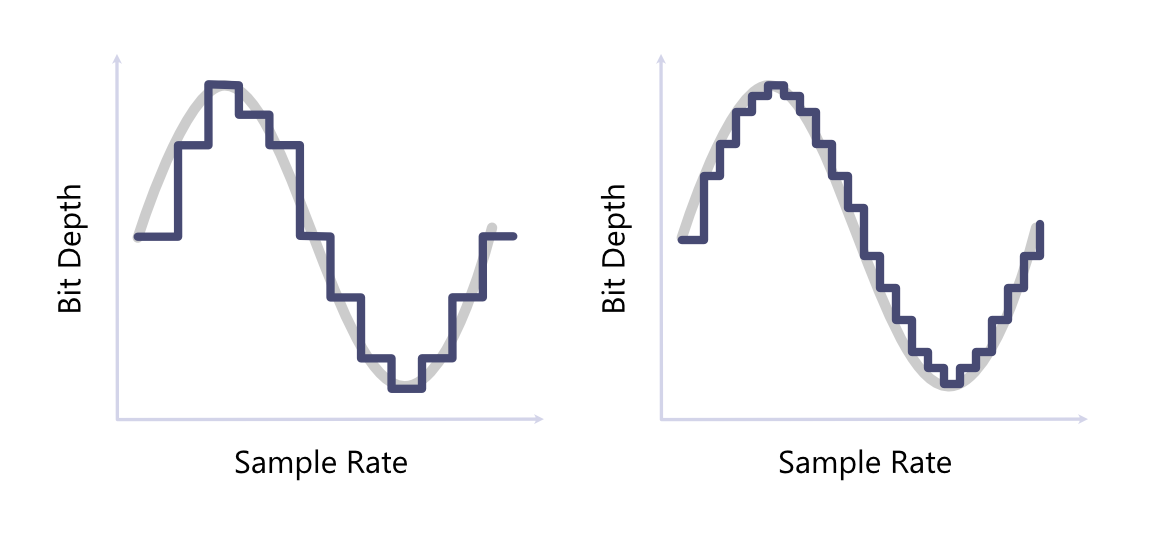
Sample rate and bit depth: Sample rate refers to the number of samples of audio carried per second, while bit depth refers to the number of bits of information in each sample. Higher sample rates and bit depths can result in more accurate representations of audio, but also lead to larger file sizes.
The graphic below shows two encoded audio signals. The left signal has half the sample rate and bit depth of the right signal, causing a noticeable difference in how accurately each stream is representing the original audio.
Lossless vs. lossy compression: Audio formats can be categorized as either lossy or lossless. Lossy formats (e.g., MP3, AAC) sacrifice some audio quality to achieve smaller file sizes, while lossless formats (e.g., WAV, FLAC) retain all the original audio data without any loss of quality.
What are the differences between audio formats?
WAV (Waveform Audio File Format): WAV is a container commonly used with uncompressed PCM audio. It is straightforward to edit and widely accepted by production software, but its large files make it inefficient for web delivery.
MP3 (MPEG Audio Layer III): MP3 is a widely used audio format known for its high compression ratio. While it sacrifices some audio quality compared to WAV, it significantly reduces file sizes, making it ideal for online streaming and distribution.
M4A (MPEG-4 Audio): M4A is a file extension commonly used for audio in an MPEG-4 container, often encoded with AAC. It is a strong default for music and general playback on modern browsers and mobile devices.
FLAC (Free Lossless Audio Codec): FLAC is a lossless compression format that retains all the original audio data without sacrificing quality. It offers significantly smaller file sizes compared to WAV while maintaining identical audio quality, making it a popular choice for audiophiles and music enthusiasts.
Ogg Vorbis: Ogg is a container and Vorbis is a lossy codec. The combination offers efficient, royalty-free web audio, but device and application support should be checked for your audience.
Opus: Opus is a modern lossy codec designed for both speech and music. It performs well at low bitrates and low latency, making it particularly useful for voice, conferencing, and interactive applications.
Below is a table summarizing the differences between each format.
| Format | Typical codec | Compression | Best fit | Main tradeoff |
|---|---|---|---|---|
| M4A | AAC | Lossy | Modern web and mobile playback | Less suitable for editing |
| MP3 | MP3 | Lossy | Maximum playback compatibility | Less efficient than newer codecs |
| FLAC | FLAC | Lossless | Archives and lossless delivery | Larger than lossy formats |
| WAV | PCM | Uncompressed | Recording and editing | Very large files |
| Ogg | Vorbis or Opus | Lossy | Open web audio | Support varies by codec and client |
| WebM | Opus | Lossy | Voice and browser-first applications | Not universal in legacy software |
How to convert between audio formats with Transloadit
The Audio Encode Robot can normalize uploaded audio to a chosen codec, container, sample rate, bitrate, and channel layout. The following Template accepts a supported input format and produces FLAC:
<!-- This pulls Uppy from our CDN -->
<!-- For smaller self-hosted bundles, install Uppy and plugins manually: -->
<!-- npm i --save @uppy/core @uppy/dashboard @uppy/remote-sources @uppy/transloadit ... -->
<link
  href="https://releases.transloadit.com/uppy/v3.10.0/uppy.min.css"
  rel="stylesheet"
/>
<button id="browse">Select Files</button>
<script type="module">
  import {
    Uppy,
    Dashboard,
    ImageEditor,
    RemoteSources,
    Transloadit,
  } from 'https://releases.transloadit.com/uppy/v3.10.0/uppy.min.mjs'
  const uppy = new Uppy()
    .use(Transloadit, {
      waitForEncoding: true,
      alwaysRunAssembly: true,
      assemblyOptions: {
        params: {
          // It's often better store encoding instructions in your account
          // and use a `template_id` instead of adding these steps inline
          steps: {
            ':original': {
              robot: '/upload/handle',
            },
            flac_encoded: {
              use: ':original',
              robot: '/audio/encode',
              result: true,
              ffmpeg_stack: 'v7',
              preset: 'flac',
            },
            exported: {
              use: ['flac_encoded', ':original'],
              robot: '/s3/store',
              credentials: 'demo_s3_credentials',
              url_prefix: 'https://demos.transloadit.com/',
            },
          },
        },
      },
    })
    .use(Dashboard, { trigger: '#browse' })
    .use(ImageEditor, { target: Dashboard })
    .use(RemoteSources, {
      companionUrl: 'https://api2.transloadit.com/companion',
    })
    .on('complete', ({ transloadit }) => {
      // Due to `waitForEncoding:true` this is fired after encoding is done.
      // Alternatively, set `waitForEncoding` to `false` and provide a `notify_url`
      console.log(transloadit) // Array of Assembly Statuses
      for (const assembly of transloadit) {
        console.log(assembly.results) // Array of all encoding results
      }
    })
    .on('error', (error) => {
      console.error(error)
    })
</script>
Check out the full interactive version of this demo here.
Before selecting an output, review the supported audio codecs and containers or explore the Audio Encoding service. For production pipelines, the Robot can create multiple delivery formats from one source upload.
What audio format should I use?
Choose based on the job the output must perform:
- General web or app playback: AAC in M4A is a practical default; offer MP3 when older clients matter.
- Speech and real-time audio: Opus delivers strong quality at low bitrates and latency.
- Lossless download or archive: FLAC preserves the signal with smaller files than uncompressed PCM.
- Editing and interchange: WAV is predictable across production tools and avoids decoding a lossy source during editing.
- Unknown user uploads: retain the original, then create one or more normalized delivery outputs rather than assuming every client can play the source.
For browser compatibility, verify the codec as well as the file extension or container. A filename alone does not tell you how its audio stream was encoded.
If you're still unsure which format you should use, talk to our team, and we'll help you navigate the process.