

What is HLS?

HLS means HTTP Live Streaming. It is an adaptive bitrate streaming protocol for delivering live and on-demand audio and video over HTTP. This guide explains its playlists, media segments, quality switching, and how to generate an HLS stream with Transloadit.
What is streaming?
Before we dive into the specifics of HLS, let's first make sure we understand streaming as a broader concept. Streaming refers to the continuous delivery, in real time, of audio or video content over the internet. Unlike traditional downloads, where the entire file needs to be downloaded before the user can start playback, streaming allows users to begin consuming content while it is being delivered.
What does HLS mean?
The HLS full form is HTTP Live Streaming. Apple developed HLS, and the protocol is publicly documented in RFC 8216. It uses ordinary HTTP delivery, so streams can be served by web servers and distributed through CDNs. HLS supports both live broadcasts and prerecorded video on demand.
How does HLS work?
Before a video can be streamed using HLS, a packaging workflow usually performs three steps:
- Encode the source into several variants, such as different resolutions and bitrates. Codec and container choices depend on the devices you need to support; Apple's current HLS authoring specification lists its playback requirements.
- Divide each variant into media segments. Segment duration is declared in the playlist rather than fixed by the HLS protocol.
- Create a Media Playlist for each variant and a Multivariant Playlist that describes the available streams.
The player downloads a playlist and chooses an appropriate variant. As network conditions change, it can request later segments from a higher- or lower-bitrate variant to maintain playback.
The diagram below illustrates how the image quality may vary as the network connection fluctuates.
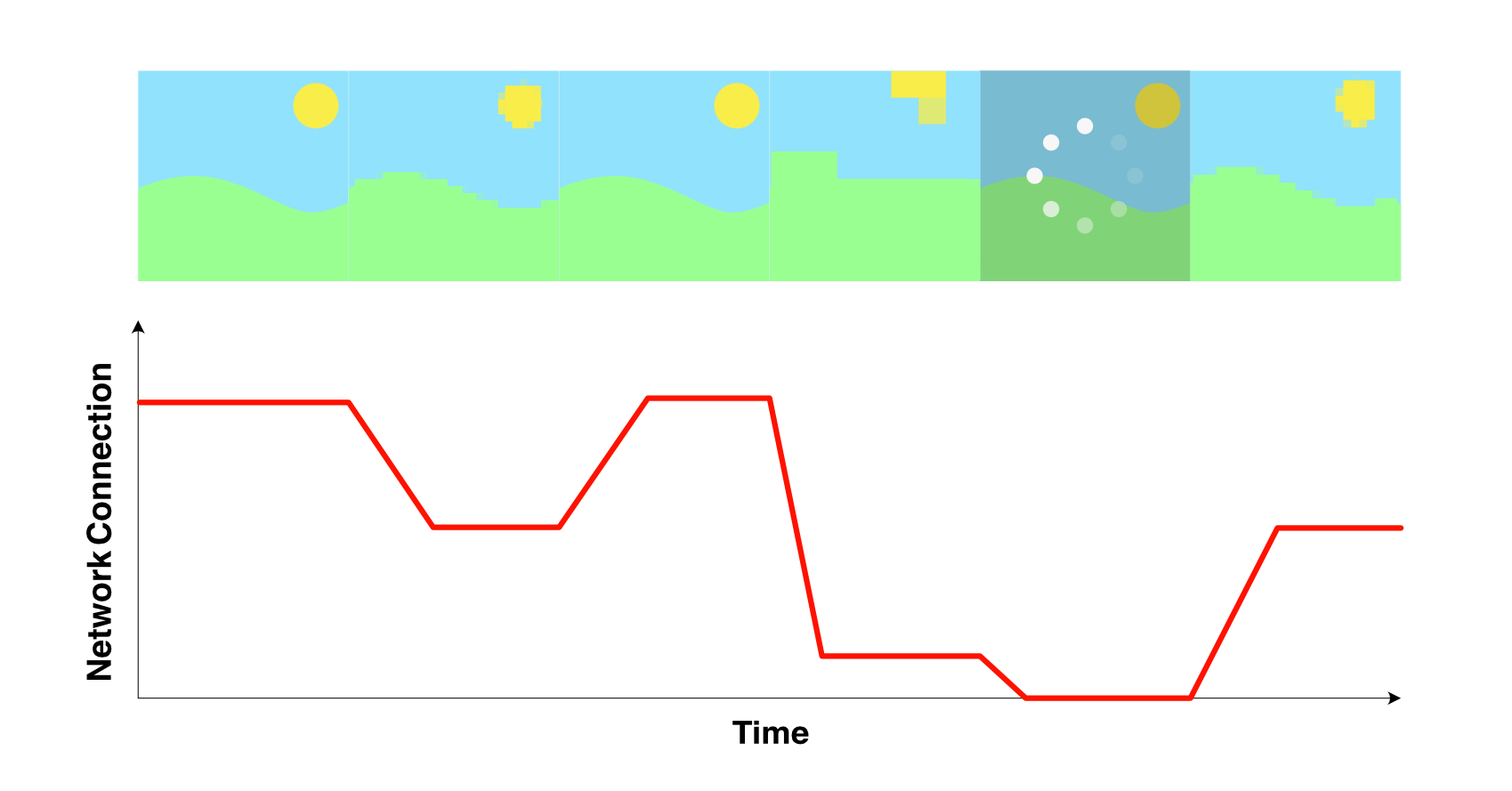
Audio, video, and subtitles can be delivered together or as separate renditions. Separate renditions make features such as alternate languages and captions possible; the playlist tells the player which renditions belong together.
What's the difference between HLS and MPEG-DASH?
Like HLS, MPEG-DASH describes segmented media and lets a player adapt between variants. The most useful differences are in their manifests, specifications, and playback ecosystems—not fixed codec or segment-duration rules.
| HLS | MPEG-DASH | |
|---|---|---|
| Manifest | M3U8 Multivariant and Media Playlists | MPD document |
| Specification | RFC 8216 and the evolving HLS specification | ISO/IEC 23009-1 |
| Media delivery | Segments fetched over HTTP | Segments fetched over HTTP |
| Apple platform support | Native frameworks and Safari support | Usually supplied through a compatible player implementation |
Both formats can provide adaptive bitrate playback, encryption, captions, alternate audio, and live or on-demand delivery. Choose based on your target players, required features, and packaging stack.
Does Transloadit support HLS?
Thanks to the /video/adaptive Robot, Transloadit supports both HLS and MPEG-DASH. Let's take a look at a Template to see how you can start using this Robot to create high-quality streamable media.
The below Template will encode a video at three different quality levels, before passing
it to the /video/adaptive Robot. It is then
segmented and indexed into a .m3u8 playlist, which can be streamed to your users using a
CDN.
<!-- This pulls Uppy from our CDN -->
<!-- For smaller self-hosted bundles, install Uppy and plugins manually: -->
<!-- npm i --save @uppy/core @uppy/dashboard @uppy/remote-sources @uppy/transloadit ... -->
<link
  href="https://releases.transloadit.com/uppy/v3.10.0/uppy.min.css"
  rel="stylesheet"
/>
<button id="browse">Select Files</button>
<script type="module">
  import {
    Uppy,
    Dashboard,
    ImageEditor,
    RemoteSources,
    Transloadit,
  } from 'https://releases.transloadit.com/uppy/v3.10.0/uppy.min.mjs'
  const uppy = new Uppy()
    .use(Transloadit, {
      waitForEncoding: true,
      alwaysRunAssembly: true,
      assemblyOptions: {
        params: {
          // It's often better store encoding instructions in your account
          // and use a `template_id` instead of adding these steps inline
          steps: {
            ':original': {
              robot: '/upload/handle',
            },
            low: {
              use: ':original',
              robot: '/video/encode',
              result: true,
              ffmpeg_stack: 'v7',
              preset: 'hls-270p',
              turbo: true,
            },
            mid: {
              use: ':original',
              robot: '/video/encode',
              result: true,
              ffmpeg_stack: 'v7',
              preset: 'hls-360p',
              turbo: true,
            },
            high: {
              use: ':original',
              robot: '/video/encode',
              result: true,
              ffmpeg_stack: 'v7',
              preset: 'hls-540p',
              turbo: true,
            },
            adaptive: {
              use: {
                steps: ['low', 'mid', 'high'],
                bundle_steps: true,
              },
              robot: '/video/adaptive',
              playlist_name: 'my_playlist.m3u8',
              technique: 'hls',
            },
            exported: {
              use: ['adaptive', ':original'],
              robot: '/s3/store',
              credentials: 'demo_s3_credentials',
              path: 'hlsdemo/${file.meta.relative_path}/${file.name}',
              url_prefix: 'https://demos.transloadit.com/',
            },
          },
        },
      },
    })
    .use(Dashboard, { trigger: '#browse' })
    .use(ImageEditor, { target: Dashboard })
    .use(RemoteSources, {
      companionUrl: 'https://api2.transloadit.com/companion',
    })
    .on('complete', ({ transloadit }) => {
      // Due to `waitForEncoding:true` this is fired after encoding is done.
      // Alternatively, set `waitForEncoding` to `false` and provide a `notify_url`
      console.log(transloadit) // Array of Assembly Statuses
      for (const assembly of transloadit) {
        console.log(assembly.results) // Array of all encoding results
      }
    })
    .on('error', (error) => {
      console.error(error)
    })
</script>
Taking a look at the generated index file my_playlist.m3u8, we can see that it stores the location
of each video quality's index file. In each of these, the segment order is preserved, as well as the
timestamp that signifies when to switch between segments.
my_playlist.m3u8
#EXTM3U
#EXT-X-STREAM-INF:BANDWIDTH=687899,FRAME-RATE=30,CODECS="avc1.4d001e,mp4a.40.5",RESOLUTION=480x270
480x270/480x270_534648_30.m3u8
#EXT-X-STREAM-INF:BANDWIDTH=1216861,FRAME-RATE=30,CODECS="avc1.4d001f,mp4a.40.5",RESOLUTION=640x360
640x360/640x360_981616_30.m3u8
#EXT-X-STREAM-INF:BANDWIDTH=1916095,FRAME-RATE=30,CODECS="avc1.4d001f,mp4a.40.5",RESOLUTION=960x540
960x540/960x540_1567376_30.m3u8
#EXT-X-ENDLIST
960x540_1567376_30.m3u8
#EXTM3U
#EXT-X-PLAYLIST-TYPE:VOD
#EXT-X-TARGETDURATION:11
#EXT-X-VERSION:3
#EXT-X-MEDIA-SEQUENCE:0
#EXTINF:10.110,
seg__0.ts
#EXTINF:10.060,
seg__1.ts
#EXTINF:1.950,
seg__2.ts
#EXT-X-ENDLIST
Wrapping up
You now know what HLS means, how its playlists and segments work, and how it differs from MPEG-DASH. To test the workflow, open the HLS demo or create a Transloadit account and build an adaptive streaming Template.