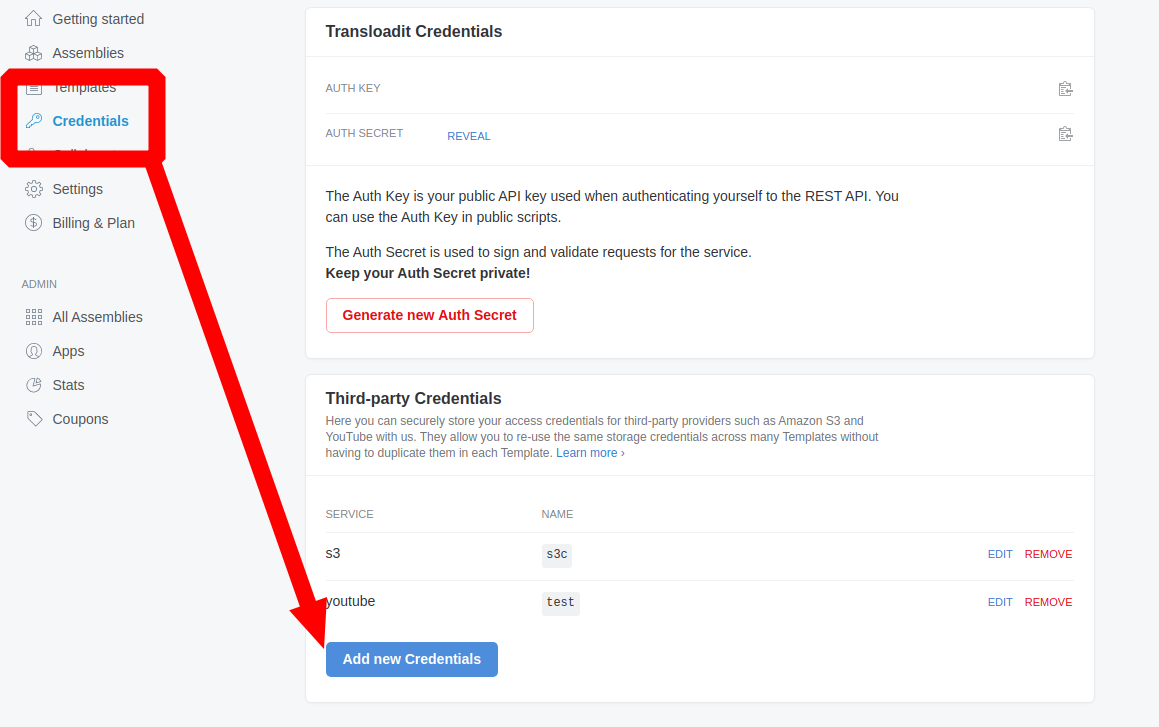
To add credentials you can follow the below steps.
1. Go to your Transloadit dashboard and click “Add new Credentials”
2. Select “Dropbox” for the service, give the credentials set a name, and enter your Dropbox access token. Then click “Save”
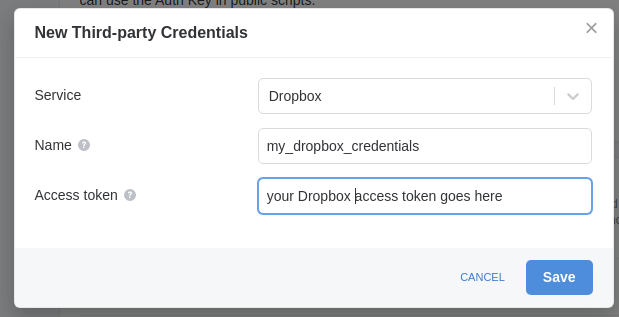
3. Use your new Dropbox credentials in a template like so.
In this example I’ll demonstrate an Assembly step for importing a file from your Dropbox storage.
"import_files_from_dropbox": {
  "robot": "/dropbox/import",
  "result": "true",
  "credentials": "my_dropbox_credentials",
  "path": "a_folder/myimage.jpeg"
}
You may also be wondering how to get your Dropbox access token to begin with. Dropbox has a good short tutorial on how to do it here: https://dropbox.tech/developers/generate-an-access-token-for-your-own-account
If you’re familiar with Dropbox already you can just go directly to https://www.dropbox.com/developers/apps/create to create an app and generate an access token for your integration!