

Transloadit now speaks your language

Choosing a file processing API is hard enough without doing it in your second language. When the pricing page, the docs, and the dashboard are only in English, someone on your team ends up translating for everyone else. Starting today, the Transloadit website, documentation, and Console are available in German, Spanish, Brazilian Portuguese, and French, so your whole team can evaluate, integrate, and operate Transloadit in the language they think in.
What is translated
German and Spanish arrived in July, Brazilian Portuguese in September, and French goes live today. Coverage differs per language, so here is the honest picture:
- Deutsch, Español, and Português (Brasil): the homepage, pricing, product, service, and solution pages, plus the documentation: getting started, core concepts, SDKs, the API reference, the FAQ, and nearly all Robot docs. Our free media tools and guides are translated too. German and Spanish also cover almost the entire blog and DevTips archive; Portuguese covers about a third so far.
- Français: we started with the path from first visit to first Assembly: the homepage, pricing and the pricing FAQ, all service pages, the docs overview, the My first app tutorial, support, company pages, and 76 DevTips. Robot docs, the API reference, and the blog are still in English.
- The Console in all four languages: sign-up and login, the dashboard, Assemblies, Templates, credentials, billing, collaborators, and settings.
Some things stay in English everywhere: API responses and error messages, emails, legal pages, and
demos. Newer Console screens can show English text until their translation lands. A link to a page
that does not exist in your language carries a small EN badge, so you know before you click.
How to switch languages
Use the globe menu in the top navigation, or the language links in the footer. We do not redirect
you based on your browser settings; you choose, and your browser remembers the choice for a year.
English URLs stay as they are, and translations live under /de/, /es/, /fr/, and /pt-BR/.
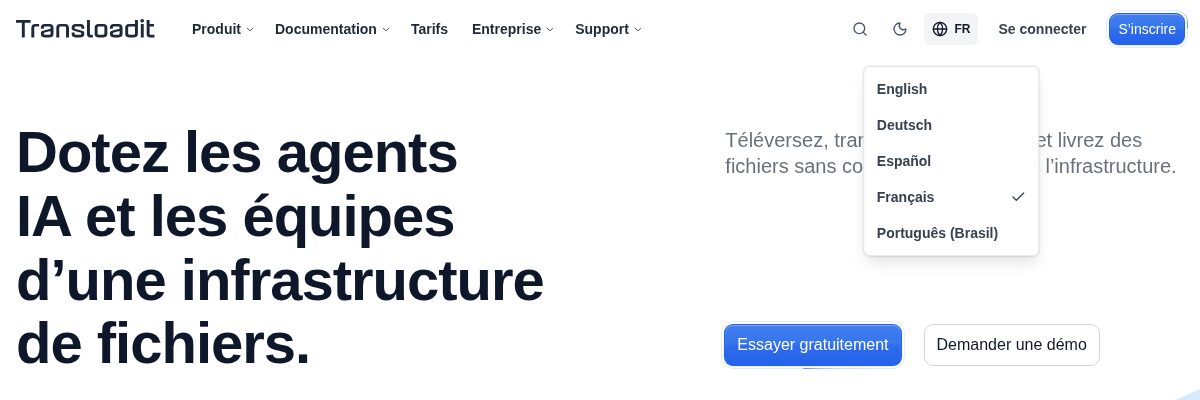
The Console follows the language you picked on the website, and the same globe menu sits in its top
navigation. Console URLs do not change: a link to an Assembly still starts with /c/, so when you
share it with a colleague, it opens in the language they picked, not yours. The preference is stored
per browser, not per account.
Where to start
| Language | Homepage | Pricing | Getting started | Robot docs |
|---|---|---|---|---|
| Deutsch | /de/ | Preise | Meine erste App | 🤖 /image/resize |
| Español | /es/ | Precios | Mi primera aplicación | 🤖 /image/resize |
| Português | /pt-BR/ | Preços | Meu primeiro app | 🤖 /image/resize |
| Français | /fr/ | Tarifs | Ma première application | English for now |
Feed your assistant docs in your language
Our docs pages have Markdown twins for AI assistants and
scripts, and translated pages have them too. Replace the trailing slash with .md:
$ curl -fsSL https://transloadit.com/pt-BR/docs/robots/image-resize.md | sed -n '1,5p'
# Converter, redimensionar ou aplicar marca-d’água em imagens

Robot: `/image/resize`

🤖/image/resize redimensiona, recorta, altera a coloração e a rotação e aplica texto e marcas-d’água a imagens.
Your Assembly Instructions stay the same in every language. Parameter names, Robot names, and code samples stay untranslated, so a snippet from the German docs works exactly like the English one.
Tell us when a translation reads wrong
We translate with an AI-assisted pipeline that protects code, parameter names, and product names, and we check every batch before it goes live. English remains the source of truth. If a sentence sounds off, or a term does not match what developers in your country say, let us know through the chat bubble on any page or at support@transloadit.com. Include the URL and the sentence, and we will fix it.
Pick your language in the top navigation and have a look around, or create a free account and start building.