<span aria-hidden="true" id="resize-strategies"></span>

# Resize Strategies

The examples below show how the `resize_strategy` impacts resizing a 400×300 pixel image to 100×100 pixels:

<span aria-hidden="true" id="resize-strategy-fit"></span>

<span aria-hidden="true" id="fit"></span>

### `fit`

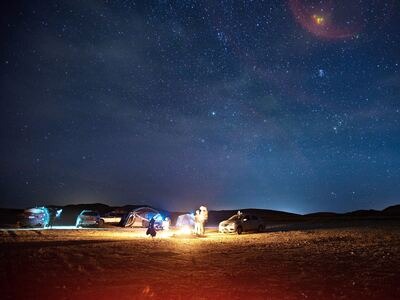
Uses the **larger** side of the original image as a base for the resize. Aspect ratio is preserved. Either side will become at most 100 pixels.

For example: resizing a 400×300 image into 100×100, would produce a 100×75 image.
<span aria-hidden="true" id="assembly-result-S1-before"></span>

##### Before:

![The fit resize strategy keeps the full image within 100 by 100 pixels](https://demos.transloadit.com/77/de8c86ef27492ebdfe2340ea6331de/desert-small.jpg)

Larger side

desert-small.jpg

21 KB ⋅ 400×300

<span aria-hidden="true" id="assembly-result-S1-after"></span>

##### After:

![The fit resize strategy keeps the full image within 100 by 100 pixels](https://demos.transloadit.com/89/0773178b6d41fda6971c74d7ac6426/desert-small.jpg)

100 px

desert-small.jpg

3.1 KB ⋅ 100×75

<span aria-hidden="true" id="resize-strategy-fillcrop"></span>

<span aria-hidden="true" id="fillcrop"></span>

### `fillcrop`

Scales the image to fit into our 100×100 target while preserving aspect ratio, while trimming away any excess surface. This means both sides will become exactly 100 pixels, at the tradeoff of destroying parts of the image.

By default the resulting image is horizontally/vertically centered to fill the target rectangle. Use the `gravity` parameter to change where to crop the image, such as `"bottom"` or `"left"`.

<span aria-hidden="true" id="assembly-result-S2-before"></span>

##### Before:

![The fillcrop resize strategy fills a 100 by 100 pixel square and crops the excess](https://demos.transloadit.com/77/de8c86ef27492ebdfe2340ea6331de/desert-small.jpg)

desert-small.jpg

21 KB ⋅ 400×300

<span aria-hidden="true" id="assembly-result-S2-after"></span>

##### After:

![The fillcrop resize strategy fills a 100 by 100 pixel square and crops the excess](https://demos.transloadit.com/9b/835c247f1b4f80bfebd96ea3d1ab9c/desert-small.jpg)

desert-small.jpg

3.9 KB ⋅ 100×100

<span aria-hidden="true" id="resize-strategy-min-fit"></span>

<span aria-hidden="true" id="min_fit"></span>

### `min_fit`

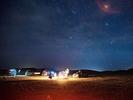
Uses the **smaller** side of the original image as a base for the resize. After resizing, the larger side will have a larger value than specified. Aspect ratio is preserved. Either side will become at least 100 pixels.

For example: resizing a 400×300 image into 100×100, would produce a 133×100 image.
<span aria-hidden="true" id="assembly-result-S3-before"></span>

##### Before:

![The min\_fit resize strategy keeps both image dimensions at least 100 pixels](https://demos.transloadit.com/77/de8c86ef27492ebdfe2340ea6331de/desert-small.jpg)

Smaller side

desert-small.jpg

21 KB ⋅ 400×300

<span aria-hidden="true" id="assembly-result-S3-after"></span>

##### After:

![The min\_fit resize strategy keeps both image dimensions at least 100 pixels](https://demos.transloadit.com/34/d5b63ec5a044fdb7e2d13b18e07d6c/desert-small.jpg)

100 px

desert-small.jpg

4.6 KB ⋅ 133×100

<span aria-hidden="true" id="resize-strategy-pad"></span>

<span aria-hidden="true" id="pad"></span>

### `pad`

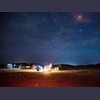
Scales the image to fit while preserving aspect ratio. Both sides of the resized image become exactly 100 pixels, and any remaining surface is filled with a background color.

In this example, the background color is determined by the[Assembly Variable](/docs/topics/assembly-instructions.md#assembly-variables) `${file.meta.average_color}`. If you set `zoom` to `false` (default is `true`), smaller images will be centered horizontally and vertically, and have the background padding all around them.
<span aria-hidden="true" id="assembly-result-S4-before"></span>

##### Before:

![The pad resize strategy adds background color to create a 100 by 100 pixel image](https://demos.transloadit.com/77/de8c86ef27492ebdfe2340ea6331de/desert-small.jpg)

desert-small.jpg

21 KB ⋅ 400×300

<span aria-hidden="true" id="assembly-result-S4-after"></span>

##### After:

![The pad resize strategy adds background color to create a 100 by 100 pixel image](https://demos.transloadit.com/a5/8b87822c454c5092cfa82d3eb3df11/desert-small.jpg)

desert-small.jpg

3.4 KB ⋅ 100×100

<span aria-hidden="true" id="resize-strategy-stretch"></span>

<span aria-hidden="true" id="stretch"></span>

### `stretch`

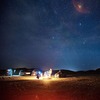
Ignores aspect ratio, resizing the image to the exact width and height specified. This may result in a stretched or distorted image.
<span aria-hidden="true" id="assembly-result-S5-before"></span>

##### Before:

![The stretch resize strategy distorts the image to exactly 100 by 100 pixels](https://demos.transloadit.com/77/de8c86ef27492ebdfe2340ea6331de/desert-small.jpg)

desert-small.jpg

21 KB ⋅ 400×300

<span aria-hidden="true" id="assembly-result-S5-after"></span>

##### After:

![The stretch resize strategy distorts the image to exactly 100 by 100 pixels](https://demos.transloadit.com/db/40e0c7367e4cd6be2c47a0a235a56d/desert-small.jpg)

desert-small.jpg

3.8 KB ⋅ 100×100

<span aria-hidden="true" id="resize-strategy-crop"></span>

<span aria-hidden="true" id="crop"></span>

### `crop`

Cuts an area out of an image, discarding any overlapping parts. If the source image is smaller than the crop frame, it will be zoomed. This strategy is implied when you specify coordinates in the`crop` parameter, and cannot be used without it.

To crop around human faces, see[🤖/image/facedetect](/docs/robots/image-facedetect.md) instead.

<span aria-hidden="true" id="assembly-result-S6-before"></span>

##### Before:

![The crop resize strategy cuts a 100 by 100 pixel area from the image](https://demos.transloadit.com/77/de8c86ef27492ebdfe2340ea6331de/desert-small.jpg)

desert-small.jpg

21 KB ⋅ 400×300

<span aria-hidden="true" id="assembly-result-S6-after"></span>

##### After:

![The crop resize strategy cuts a 100 by 100 pixel area from the image](https://demos.transloadit.com/97/4d8ba623cc49d588a81baa1247a3a6/desert-small.jpg)

desert-small.jpg

2.8 KB ⋅ 100×100